Available for Windows
Five fields · one original instrument signal
Envelopment Five
Keep the player in focus while the sound spreads to either side. Start with Gentle or Wide, then blend five layers that use small timing differences, changes in level, and resonance to give a dry recording a sense of space.
This is a one-time price. Purchase is handled through secure Polar checkout.
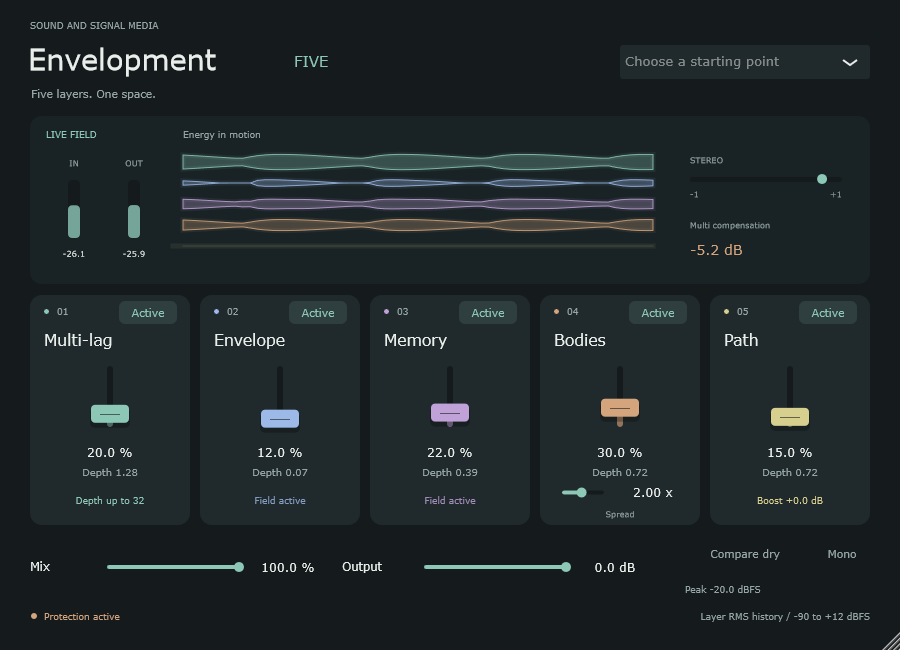
Five parallel fields, blended in one processor
Give each layer a job.
Try Gentle on a close-miked instrument. Switch the layers off and on as a phrase plays, then raise Amount on the one that adds the space you want. Mix brings the layers up around a single dry signal.
- Multi-lagUses several short delays that adapt to the recent sound. It trims the level of this layer when the delays add too much energy.
- Envelope and MemoryListen to these layers one at a time. Each has its own Active switch and Amount, so you can hear how it follows a phrase before blending them.
- BodiesAdds a pair of resonances. Spread moves their frequencies farther apart, and Decay controls how long they ring.
- PathAdds resonators that feed one another. Raise Amount on a picked or bowed phrase to bring out their response.
- Listening and levelsThe moving ribbons show what each layer is contributing. Check the blend in mono and use Output to match the level when comparing.
Explore the rest of the collection.
Return to the store for the rest of the Windows tools and the Android practice and field apps.